

Last updated: 28 October 2026. Tradesyncer details are as of 28 October 2026, from Tradesyncer’s own website and help center.
Quick answer: Tradesyncer is a cloud trade copier that works across many platforms and keeps copying while your computer is off. Q-My-Trade is a NinjaTrader 8 add-on built for traders running many prop firm accounts: it copies or rotates trades across any number of accounts for $29.99 a month or $349.99 once. If you trade in NinjaTrader 8 with a large number of accounts, Q-My-Trade usually costs less; if you don’t use NinjaTrader, or need copying with your PC off and no VPS, Tradesyncer is the better fit.
Q-My-Trade vs Tradesyncer at a glance
| Q-My-Trade | Tradesyncer | |
|---|---|---|
| Price | $29.99/month or $349.99 lifetime | $49, $99 or $149/month; $34, $69 or $104/month billed yearly |
| Accounts | Unlimited | Up to 20 (Basic), 80 (Pro) or 120 (Flex, more at extra cost) |
| Where it runs | Inside NinjaTrader 8 on your Windows PC or VPS | In the cloud; web, Windows, macOS, iOS and Android apps |
| Platforms | NinjaTrader 8 with Tradovate and Rithmic accounts | Tradovate, Rithmic, NinjaTrader and more |
| Rotation between accounts | Yes (ROTATE) | Not listed on Tradesyncer’s site as of 28 October 2026 |
| Hedge protection | On by default, across your accounts and correlated markets | Hedge Guard is listed as “coming soon” in Tradesyncer’s help center |
| Per-account limits | MAX WIN, MAX LOSS and balance target caps | Daily loss limits, daily profit targets and time lockouts |
| Mini to micro copying | Yes (for example NQ to MNQ) | Yes (ES, NQ and YM to their micros) |
| Trade review | Built in Journal and Analysis | Journal and prop firm tracker |
What does each one cost as your account count grows?
Tradesyncer prices by connections (logins to a platform or prop firm) and accounts. Q-My-Trade has one price for any number of accounts. Here’s what each costs over a year at three account counts, using Tradesyncer’s published plan prices:
| Your setup | Tradesyncer plan | Tradesyncer per year | Q-My-Trade per year |
|---|---|---|---|
| Up to 20 accounts on 2 logins | Basic: $49/month or $34/month yearly | $588 monthly, or $408 yearly ($34 × 12) | $359.88 monthly ($29.99 × 12), or $349.99 once |
| Up to 80 accounts on 4 logins | Pro: $99/month or $69/month yearly | $1,188 monthly, or $828 yearly ($69 × 12) | $359.88 monthly, or $349.99 once |
| Up to 120 accounts, any number of logins | Flex: $149/month or $104/month yearly | $1,788 monthly, or $1,248 yearly ($104 × 12) | $359.88 monthly, or $349.99 once |
The lifetime license is a one-off payment, so from the second year on Q-My-Trade costs nothing more. To be fair to Tradesyncer, two costs sit on our side of the table: Q-My-Trade needs NinjaTrader 8 running, so if you want it to copy while your own PC is off you’ll pay for a VPS, and Tradesyncer sometimes runs first-month or seasonal discounts. Check Tradesyncer’s pricing page for current offers.
Features for running prop firm accounts
Rotation
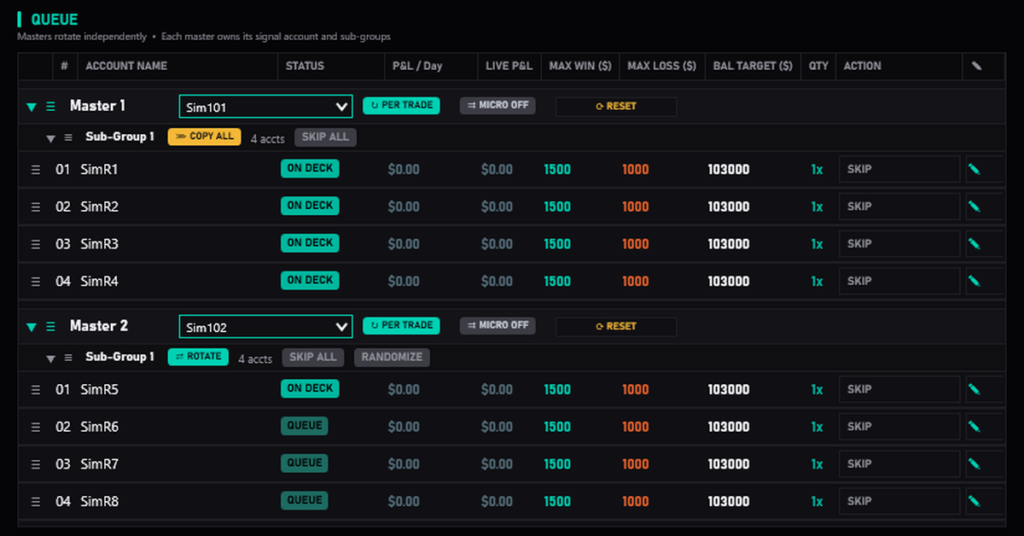
Both tools copy one lead account to many followers. Q-My-Trade also has ROTATE: each signal goes to the next account in a sub-group in turn, so one losing trade doesn’t land on every funded account at once, and each account builds its own trade history. You can run COPY ALL and ROTATE side by side, one per sub-group. Rotation is not listed on Tradesyncer’s site as of 28 October 2026. Our guide to trade copiers vs account rotators explains when rotation helps.
Hedge protection
Most prop firms ban holding opposite positions across your own accounts. Q-My-Trade’s Hedge Protection is on by default: it refuses any copy that would put your accounts on opposite sides of the same market group, including correlated markets such as ES and NQ (equity index), GC and MGC (gold) or CL and MCL (crude). It’s a safeguard, not a guarantee: it doesn’t act on trades you place by hand, and staying within your prop firm’s rules is up to you.
Tradesyncer’s help center describes Hedge Guard, marked “coming soon” as of 28 October 2026, which closes a follower’s position if it’s opposite the leader’s. The article doesn’t say which markets it will cover.
Per-account limits
Q-My-Trade gives each account its own MAX WIN, MAX LOSS and balance target caps. When a cap is hit, that account stops taking new trades. Caps don’t close a position that’s already open, so leave room for one more losing trade. Tradesyncer offers daily loss limits, daily profit targets and time or session lockouts, enforced in its cloud. Both approaches suit prop accounts; check which matches how your firm measures its limits.
Where each one runs: the cloud or NinjaTrader 8
Tradesyncer runs in the cloud, so copying can continue when your computer is off, with no VPS, and you can check your accounts from its mobile apps. It connects to several platforms, so it also suits traders who don’t use NinjaTrader. Tradesyncer says it’s used by more than 25,000 futures traders.
Q-My-Trade runs inside NinjaTrader 8, on your Windows PC or a VPS. It only copies while NinjaTrader 8 is open, so if you close NinjaTrader or turn your PC off, copying stops. In return, your copier lives in the same platform you trade in: the panel sits in NinjaTrader 8, it works with Tradovate and Rithmic prop accounts connected at the same time, and your license is a one-off cost if you choose lifetime.
When Tradesyncer is the better choice
- You don’t trade in NinjaTrader 8. Q-My-Trade is NinjaTrader 8 only.
- You want copying with your PC off and no VPS. Tradesyncer runs in the cloud; Q-My-Trade needs NinjaTrader 8 open.
- You manage accounts from your phone. Tradesyncer has iOS and Android apps.
- You want a free trial first. Tradesyncer offers 7 days (card required).
When Q-My-Trade is the better choice
- You trade in NinjaTrader 8 with many prop accounts. One price covers any number of accounts.
- You want to rotate trades between accounts, not only copy every trade to every account.
- You’d rather pay once. The $349.99 lifetime license costs less than one year of Tradesyncer’s Pro plan billed yearly ($828).
- You want hedge protection on by default, across your accounts and correlated markets.
- You want a journal, analysis and strategy optimization in one price. Q-My-Trade has its own built-in journal and analysis, and Refine-My-Trade, an independent analysis and strategy optimization tool, is included.
For a wider view, our comparison of NinjaTrader trade copiers for prop firms covers Replikanto, CrossTrade, Tradecopia and Affordable Indicators too.
Frequently asked questions
Is there a cheaper Tradesyncer alternative for NinjaTrader 8?
If you trade in NinjaTrader 8, Q-My-Trade costs $29.99 a month or $349.99 once for any number of accounts. Tradesyncer’s plans cost $49 to $149 a month ($34 to $104 a month billed yearly), as of 28 October 2026. Q-My-Trade needs NinjaTrader 8 running, so add a VPS if you want it to copy while your PC is off.
Does Q-My-Trade work with Tradovate?
Yes. Q-My-Trade works with Tradovate and Rithmic prop accounts connected in NinjaTrader 8, including both at the same time.
Does Q-My-Trade run in the cloud like Tradesyncer?
No. Q-My-Trade runs inside NinjaTrader 8 on your Windows PC or a VPS, and copies only while NinjaTrader 8 is open.
Can Q-My-Trade rotate trades between accounts?
Yes. ROTATE sends each signal to the next account in a sub-group in turn. COPY ALL sends every signal to every account. You can use both, one per sub-group.
Can Q-My-Trade copy a mini signal to micro accounts?
Yes. Turn on cross-instrument copying for a master to copy, for example, an NQ signal as MNQ on the follower accounts. Tradesyncer offers the same for ES, NQ and YM with its Cross Order setting.
Get started
Check your prop firm’s current rules on trade copiers, then see how Q-My-Trade works or compare plans.