

Last updated: 27 October 2026
Quick answer: NinjaTrader 8 doesn’t include a built-in trade copier, so to copy trades across multiple accounts you add a trade copier add-on. With Q-My-Trade, you pick one signal account, put your other accounts in a group, choose COPY ALL, and every trade on the signal account is copied to those accounts the moment it fills. That works with Tradovate and Rithmic prop accounts connected in NinjaTrader 8, including a Rithmic prop firm and a Tradovate prop firm at the same time.
This guide covers what NinjaTrader 8 can and can’t do on its own, the setup step by step, and what to check before you copy trades to funded accounts.
Does NinjaTrader 8 have a built-in trade copier?
No. NinjaTrader’s own support staff confirmed in 2024 that there’s no native tool in NinjaTrader 8 to copy or replicate trades across your connected accounts, and pointed traders to third-party copiers (NinjaTrader forum).
NinjaTrader 7 had a feature called Account Groups that sent a new order to every account in a group, but later changes to those orders weren’t copied, so each account still had to be managed by hand (NinjaTrader 7 help guide). In NinjaTrader 8 you add a copier as an add-on.
What you need before you start
- NinjaTrader 8, version 8.1.8.4 or later, on Windows. From 1 November 2026 NinjaTrader is rolling out backend upgrades, and prop firms such as Lucid Trading have told traders that older Desktop versions won’t connect. Check yours under Help → About in the Control Center.
- Your accounts connected in NinjaTrader 8. Q-My-Trade works with Tradovate and Rithmic prop accounts, and with both kinds connected at the same time, so you can copy across more than one prop firm.
- One account to trade from (the signal account) and at least one account to copy to. Q-My-Trade’s user guide recommends a Sim account as the signal account, so a prop firm’s action on your lead account, such as a daily loss pause, can’t affect your followers.
- Your prop firm’s rules. Check your prop firm’s current rules on trade copiers and multiple accounts before you connect anything.
How to copy trades in NinjaTrader 8 with Q-My-Trade
- Install. Log in and download the Q-My-Trade zip from the Downloads page. In NinjaTrader 8, go to Tools → Import → NinjaScript Add-On and choose the zip (don’t unzip it first).
- Open the panel and activate. In NinjaTrader 8, go to Tools, then Q-My-Trade. Click the red ACTIVATE badge, paste your license key and click ACTIVATE; the badge changes to ✓ LICENSED.
- Create a master. Add a Master Group and set its signal account: the account you’ll actually trade on.
- Add a sub-group and choose COPY ALL. Every eligible account in a COPY ALL sub-group takes every signal at the same time.
- Add your follower accounts to the sub-group, and set each one’s size: copy the signal’s exact size with Mirror Signal Qty, or scale it with the QTY multiplier.
- Set caps. Give each account a MAX WIN and MAX LOSS cap, and a balance target if you want an account to stop at a goal. When a cap fires, that account stops taking new trades.
- Start copying. Open a chart for the instrument you trade and apply the Q-My-Trade strategy with its Account set to your signal account. Copying starts as soon as the strategy is on; trade the signal account as normal.
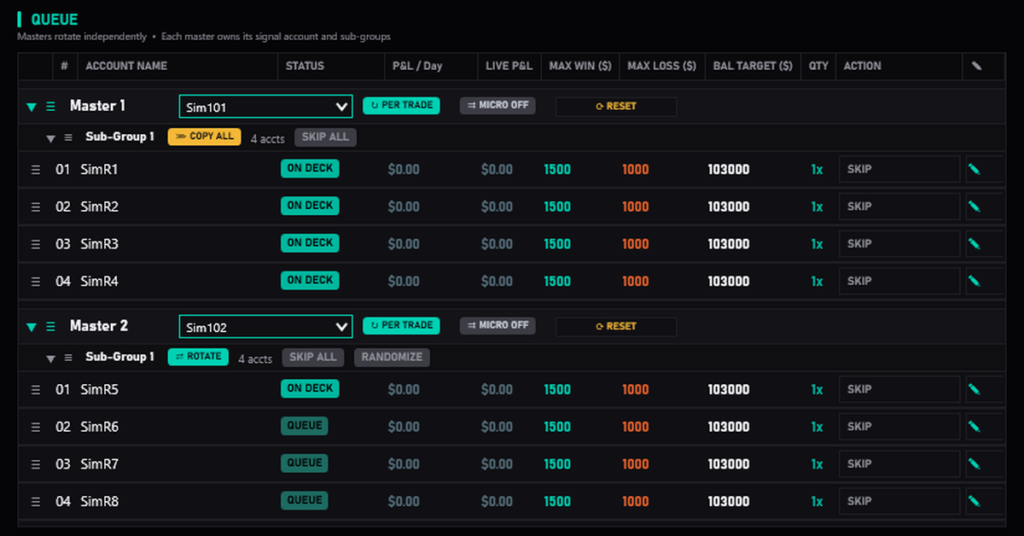
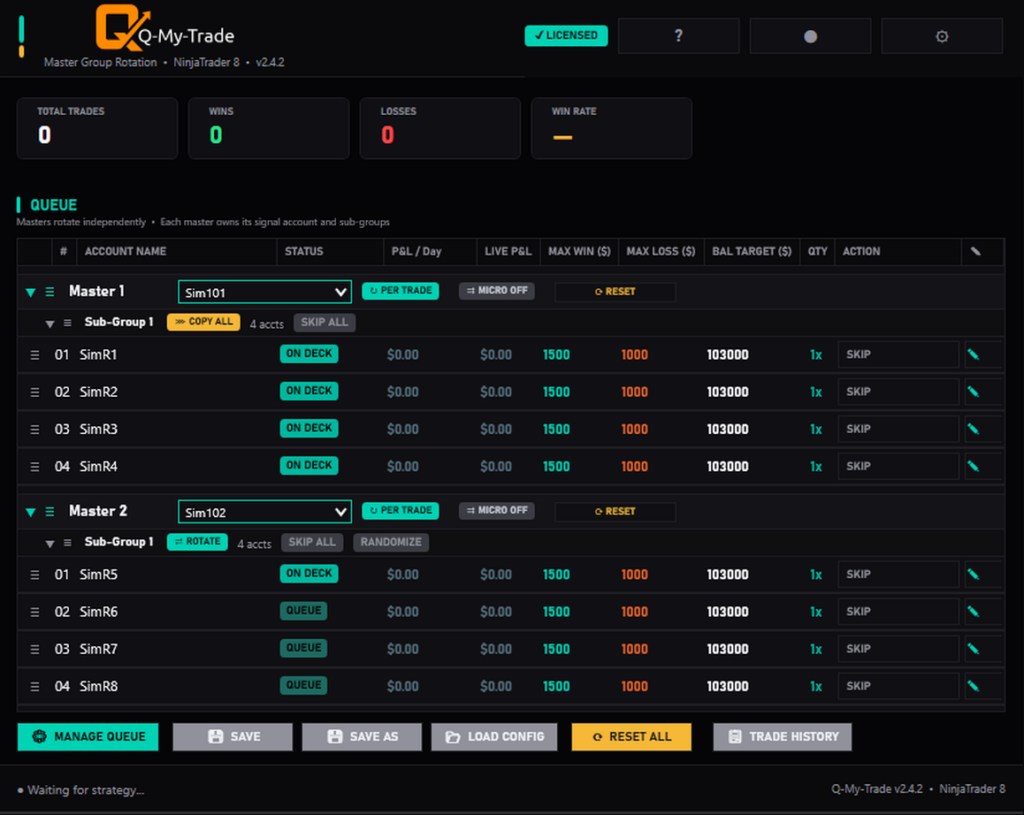
From then on, entries, scale-ins, partial closes, full closes and reversals on the signal account are copied when they fill, not on the next price tick. To copy a mini signal as a micro (for example NQ to MNQ), turn on cross-instrument copying for that master.
Copy every trade, or rotate between accounts?
COPY ALL puts every signal on every account at once, which suits evaluations you’re trying to pass together. ROTATE sends each signal to the next account in turn, so one losing trade doesn’t hit every account at once, which many traders prefer for funded accounts. To run both on every signal, use two masters: one with a COPY ALL group, one with a ROTATE group. Our guide to ROTATE vs COPY ALL covers which to use when.
What to check before you copy trades to funded accounts
- Copying multiplies losses as well as wins. Five accounts copying one losing trade means five losing trades. Size each account for its own drawdown.
- Caps don’t close open trades. A MAX LOSS cap stops new trades on that account, but a position that’s already open keeps running until your strategy or you close it. Set caps with room for one more losing trade.
- Keep Hedge Protection on. It’s on by default and refuses any copy that would put your accounts on opposite sides of the same market group (equity index, gold or crude). It’s a safeguard, not a guarantee: it doesn’t cover trades you place by hand, and staying within your prop firm’s rules is up to you.
- Don’t trade the follower accounts by hand. Q-My-Trade can’t tell a deliberate manual trade from a stray position.
- Test on Sim first. Run the whole setup on Sim accounts for a session before you switch real prop accounts on.
Frequently asked questions
Can NinjaTrader 8 copy trades between accounts on its own?
No. NinjaTrader 8 doesn’t include a native trade copier. You add one as an add-on, such as Q-My-Trade.
Can I copy trades between Tradovate and Rithmic accounts?
Yes. Q-My-Trade works with Tradovate and Rithmic prop accounts in NinjaTrader 8, including both connected at the same time, so one signal can be copied to accounts at more than one prop firm.
Is copying trades allowed at prop firms?
It depends on the firm. Many allow copying between your own accounts, but rules on account limits and hedging differ, so check your prop firm’s current rules on trade copiers before you start.
Does a loss cap close my open trades?
No. When an account hits its MAX LOSS cap, Q-My-Trade stops sending it new trades, but any open position keeps running until your strategy or you close it.
Get started
Q-My-Trade costs $29.99 a month or $349.99 for a lifetime license, and Refine-My-Trade is included. See how Q-My-Trade works or compare plans.