

Last updated: 26 October 2026
Quick answer: NinjaTrader 8’s Trade Performance window and Strategy Analyzer give you a detailed, well-documented picture of how your trades performed. What they weren’t built to answer are prop firm questions: what different exits would have done to the trades you actually took, whether your trades would have survived your firm’s trailing drawdown and consistency rules, and whether a daily stop would have helped. Refine-My-Trade, a NinjaTrader 8 add-on, records your trades tick by tick and tests those questions against your own rules.
If you trade prop firm accounts on NinjaTrader 8, you’ve probably opened Trade Performance after a rough week and found plenty of numbers, but not the answer you were looking for. That isn’t a flaw in NinjaTrader. Its reports answer “how did my trades perform?” very well. A prop trader usually needs to know something else: “would my account have survived, and what should I change?”
This guide covers what NinjaTrader’s reports do well, the questions they leave open for prop firm traders, and how to answer them. Every NinjaTrader detail below comes from NinjaTrader’s own help guide, checked on 26 October 2026.
What NinjaTrader’s Trade Performance does well
Credit where it’s due. NinjaTrader 8 has one of the most complete performance toolsets of any retail platform:
- A deep set of statistics, each with a published formula: profit factor, Sharpe and Sortino ratios, max drawdown, max consecutive winners and losers, average MAE, MFE and ETD, and entry and exit efficiency (statistics definitions).
- Time-of-day and weekday analysis is built in: the Analysis display can group results by hour of day, half-hour and day of week (performance displays).
- Accurate live MAE and MFE. For real-time trades, NinjaTrader records the highest and lowest price seen during the trade, including bid and ask prices.
- Live prop risk status. The Accounts tab can show how much of your daily loss limit you’ve used and how much trailing drawdown remains, where your connection provides it (Accounts tab).
- The Strategy Analyzer runs backtests, optimization, walk-forward tests and Monte Carlo simulation on NinjaScript strategies (Strategy Analyzer).
If you want to know how your trading performed, NinjaTrader answers that well. The gaps below are about different questions.
Why prop firm traders need different answers
A prop firm account isn’t judged on profit factor or Sharpe ratio. It’s judged on rules: a trailing or end-of-day drawdown, a daily loss limit, a consistency limit on your best day (you can check that one with our free consistency rule calculator), a minimum number of trading days, and payout rules. Two traders with identical Trade Performance stats can have very different outcomes: one passes and gets paid, the other breaches on a single bad afternoon.
Those rules depend on the order and size of your trades day by day, and on how far each open trade went against you. That’s the information a prop trader needs analyzed, and it’s where these five questions come in.
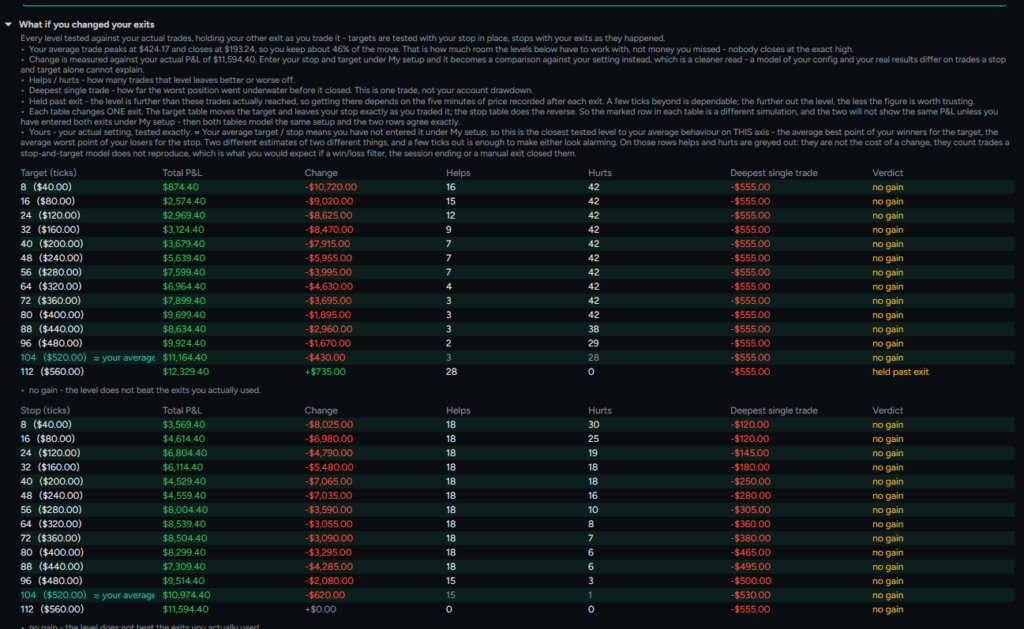
1. What would different exits have done to the trades you actually took?
NinjaTrader’s Strategy Analyzer can optimize stops and targets, but only for coded NinjaScript strategies run on historical data. If you trade by hand, or want to test your real live trades, Trade Performance shows what happened, but it can’t replay those trades with a different stop, target, break-even or trailing stop.
How Refine-My-Trade answers it: it records every tick between your entry and exit, plus five minutes after each exit (which is how it can test targets wider than the one you took), then replays your actual trades at each target, stop, break-even and trailing stop level, changing one setting at a time. For each level you see the total P&L, the change from what you actually did, how many trades it would have helped or hurt, and the deepest single trade you’d have had to sit through. If nothing beats your current exits, it says so. That’s a useful answer too.
2. Would your trades have survived your prop firm’s rules?
NinjaTrader shows live risk status for the current session, which is useful while you trade. What it doesn’t do is replay your past trades against a full rule set (drawdown, daily loss limit, consistency, minimum days and payout rules) to show where an account would have passed, breached or been paid. Even Tradovate’s own guide notes that mid-session readings may not reflect the final daily calculation and points traders to the firm’s dashboard (Tradovate).
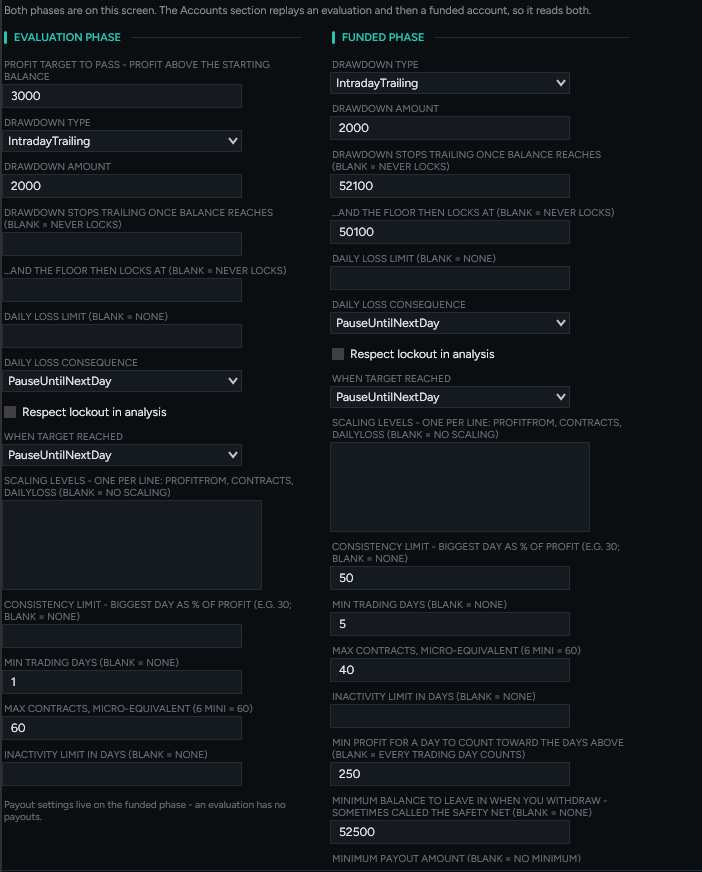
How Refine-My-Trade answers it: you enter your firm’s rules for the evaluation and funded phases separately:
- Drawdown type (static, end-of-day or intraday trailing), amount and lock level
- Daily loss limit and what happens when it’s hit
- Consistency limit, minimum trading days and minimum profit for a day to count
- Scaling levels, max contracts and inactivity limit
- Payout safety net and minimum payout
It then runs your recorded trades through an evaluation and the funded accounts that follow, day by day. You see each day’s balance, drawdown floor and consistency position, how many accounts would have been blown, passed or funded, and the payouts the rules would have allowed, including which rule held a payout back.
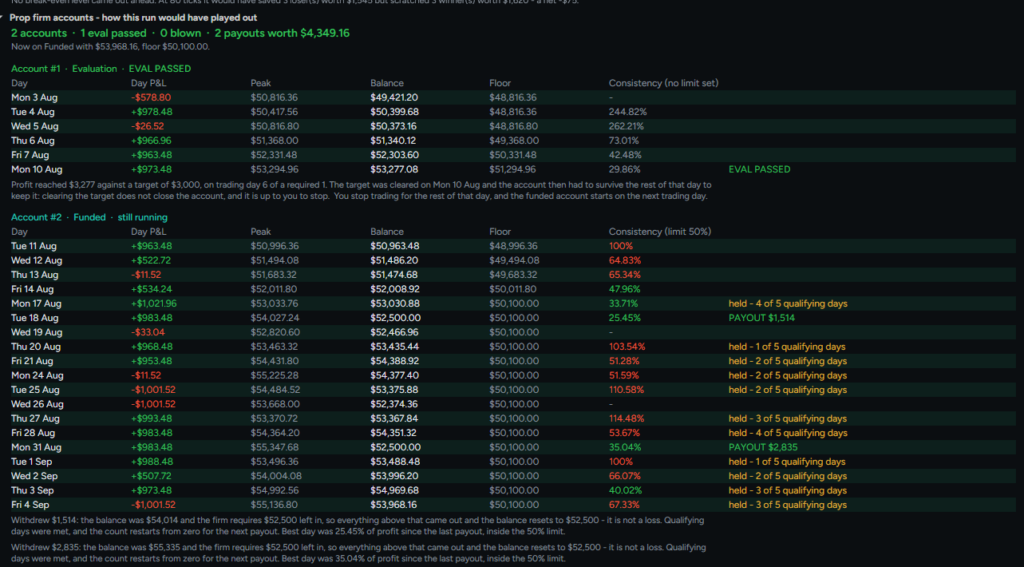
These are modelled outcomes based on the rules you enter, not predictions or a guarantee of compliance. Always check the values against your firm’s current rules and your account dashboard.
3. Is NinjaTrader’s max drawdown the same as your prop firm’s drawdown?
Not necessarily. NinjaTrader defines max drawdown from realized profit and loss (statistics definitions). That’s a sound measure, but many prop firm accounts trail a drawdown from the intraday or end-of-day high, depending on how the firm sets up the account. A report can show a comfortable max drawdown while the account’s real trailing floor came much closer during the day.
How Refine-My-Trade answers it: it models static, end-of-day and intraday trailing drawdowns, including the balance where the drawdown stops trailing and locks, against the tick data it recorded. The account replay shows the floor for every day, so you can see how close each day came.
4. How accurate are MAE and MFE in a backtest?
For live trades, NinjaTrader’s MAE and MFE use the real prices seen during the trade. In backtests, NinjaTrader’s help guide notes that the high and low of the bar series are used instead, so MAE, MFE and the efficiency stats are approximations whose accuracy depends on the bar size (statistics definitions). NinjaTrader is open about this and publishes a full page on why backtests and real-time results differ.
How Refine-My-Trade answers it: once you press Start capture, it records every trade on the selected account tick by tick, on any account type: live, Sim, or Playback and Market Replay. Practicing a strategy in Playback gives you tick-level detail on how far each trade went for and against you, rather than a bar-based estimate.
5. Would a daily stop or daily profit target have helped?
NinjaTrader reports your streaks and lets you view results day by day. It doesn’t simulate rules like “stop for the day at -$500”, “stop once I’m up $800” or “stop after two losses in a row”, which are exactly the rules prop traders argue about.
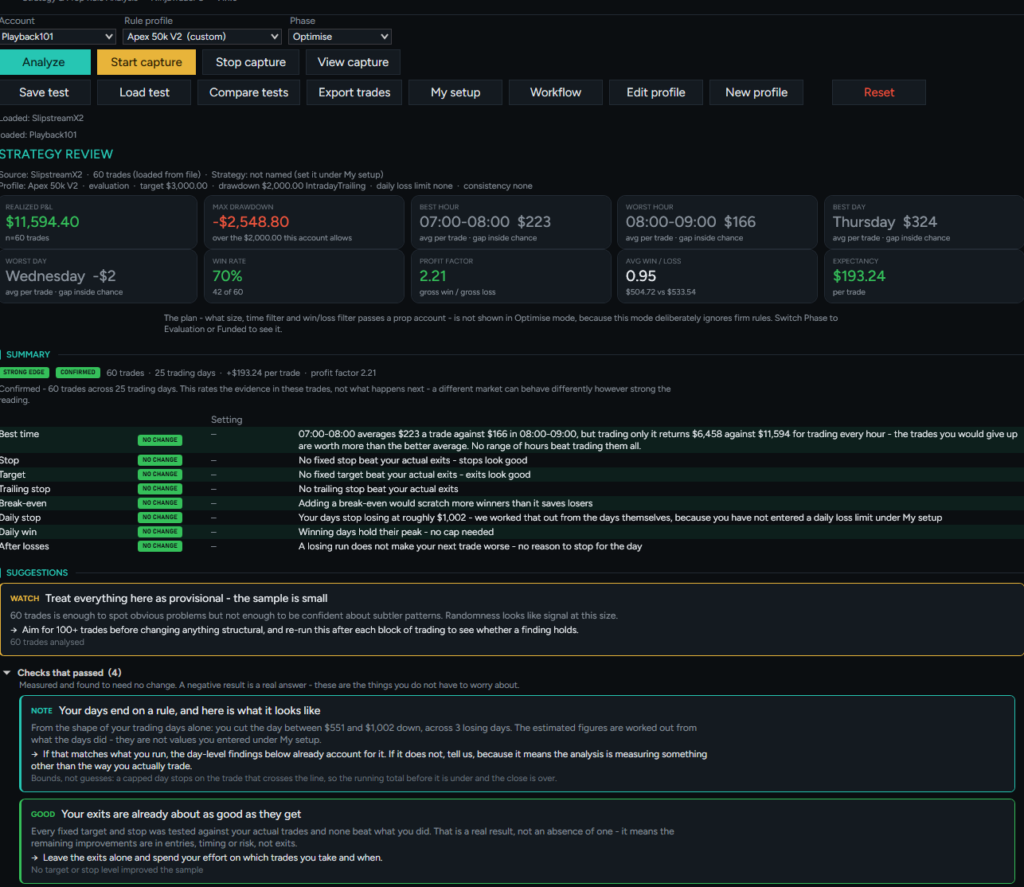
How Refine-My-Trade answers it: it tests a daily stop, a daily profit cap and your performance after losing trades within a day, against your actual days. It also tests how much slippage your edge can absorb and which hours and weekdays hold up. The summary gives each setting a verdict, such as NO CHANGE or TEST IT, with the tables behind it.
How many trades do you need before changing anything?
More than most people think. NinjaTrader offers a probability statistic and Monte Carlo simulation for Strategy Analyzer backtests, but Trade Performance won’t warn you that your “best hour” rests on four trades.
Refine-My-Trade rates the size of an edge and the strength of the evidence separately. It dims groups with too few trades, rejects findings that rest on one outlier, flags settings that fall apart with a one-tick change, and recommends at least 100 trades before any structural change. Sometimes the most useful thing a report can tell you is to wait for more data.
One more NinjaTrader detail worth knowing: scale-ins and partial fills appear as separate trades in Trade Performance, which can skew your trade count and win rate. We covered that in Why your NinjaTrader trade count is lying to you.
How Refine-My-Trade works alongside NinjaTrader
Refine-My-Trade doesn’t replace NinjaTrader’s reports; it answers different questions. It runs inside NinjaTrader 8 as an add-on and is observation only: it never places, changes or cancels orders, and never closes a position. You can save, load and compare tests, and export your trades.
- Included with Q-My-Trade Monthly and Lifetime
- Or $49.99 on its own, as a lifetime license for one NinjaTrader installation
| Good to know: Refine-My-Trade’s results are modelled from the trades it recorded and the rules you enter. They show what those trades would have done under those rules, not what will happen next, and they don’t guarantee compliance with any prop firm’s rules. |
Frequently asked questions
How does NinjaTrader 8 calculate MAE and MFE?
MAE is the worst price a trade reached compared with the entry, and MFE is the best price reached. For live trades, NinjaTrader uses the real highest and lowest prices seen during the trade, including bid and ask. In backtests it uses the high and low of the bar series, so the figures are approximations.
Can NinjaTrader show my performance by time of day?
Yes. In Trade Performance, open the Analysis display and set the period to hour of day, half-hour of day or day of week, grouped by entry or exit time.
Is NinjaTrader’s max drawdown the same as my prop firm’s drawdown?
Not necessarily. NinjaTrader calculates max drawdown from realized profit and loss, while prop firms often trail the drawdown from an intraday or end-of-day high. Check your firm’s rules and dashboard for the figure that counts.
Where can I see my daily loss limit and trailing drawdown in NinjaTrader 8?
In the Control Center’s Accounts tab, add the risk columns, such as daily loss limit and trailing max drawdown, where your connection provides them. Confirm the figures on your prop firm’s dashboard.
Why are my live results different from my backtest?
Backtests fill on historical bar data, while live fills depend on the bid, ask and volume at the moment you trade. NinjaTrader’s help guide has a full page on the differences between backtest and real-time results.
Can I test different stops and targets on trades I’ve already taken?
Not in NinjaTrader’s Trade Performance window, which reports what happened. Refine-My-Trade records the tick data of your trades and replays them at different stops, targets, break-even and trailing stop levels.
Which accounts can Refine-My-Trade analyze?
Any account type: live, Sim, and Playback or Market Replay. Once you press Start capture, it records every trade on the selected account tick by tick.
Does Refine-My-Trade place or manage trades?
No. It’s observation only and never places, changes or cancels orders. It analyzes the trades it recorded against the rules you enter.
Try Refine-My-Trade
If your NinjaTrader stats look fine but your prop accounts tell a different story, Refine-My-Trade shows you why, using your own trades and your firm’s rules.
See what Refine-My-Trade does · View plans and pricing
Hypothetical results: the screenshots in this article show Refine-My-Trade analyzing simulated (Sim) trades, so any results shown are hypothetical. Hypothetical performance results have many inherent limitations, some of which are described below. No representation is being made that any account will or is likely to achieve profits or losses similar to those shown; in fact, there are frequently sharp differences between hypothetical performance results and the actual results subsequently achieved by any particular trading program. One of the limitations of hypothetical performance results is that they are generally prepared with the benefit of hindsight. In addition, hypothetical trading does not involve financial risk, and no hypothetical trading record can completely account for the impact of financial risk of actual trading. For example, the ability to withstand losses or to adhere to a particular trading program in spite of trading losses are material points which can also adversely affect actual trading results. There are numerous other factors related to the markets in general or to the implementation of any specific trading program which cannot be fully accounted for in the preparation of hypothetical performance results and all which can adversely affect trading results.
NinjaTrader details are from NinjaTrader’s help guide, checked 26 October 2026. NinjaTrader® is a registered trademark of NinjaTrader Group, LLC. No NinjaTrader company has any affiliation with the owner, developer, or provider of the products or services described herein, or any interest, ownership or otherwise, in any such product or service, or endorses, recommends or approves any such product or service.